





Upgrades & Limits
The island bank, island level, what each upgrade does and how big your island can get.
Island Upgrades make your island better: more OneBlocks, faster crops, more spawners and more storage. Your team pays for them together from the Island Bank, a money box everyone on the team shares.
512x512
Biggest island
4
Most OneBlocks
400
Most spawners
Island Bank
- 1
Open the Server Menu
Tap the Server Menu item in your last hotbar slot, or type
/menu. It opens on the Island tab. - 2
Tap Island Bank
You see the bank's money and your own.
- 3
Put money in
Tap Deposit, Deposit Half or Deposit All. Every member can do this.
Taking money out (Withdraw) is for Admin and higher. Need money? See Making Money.
Island Level
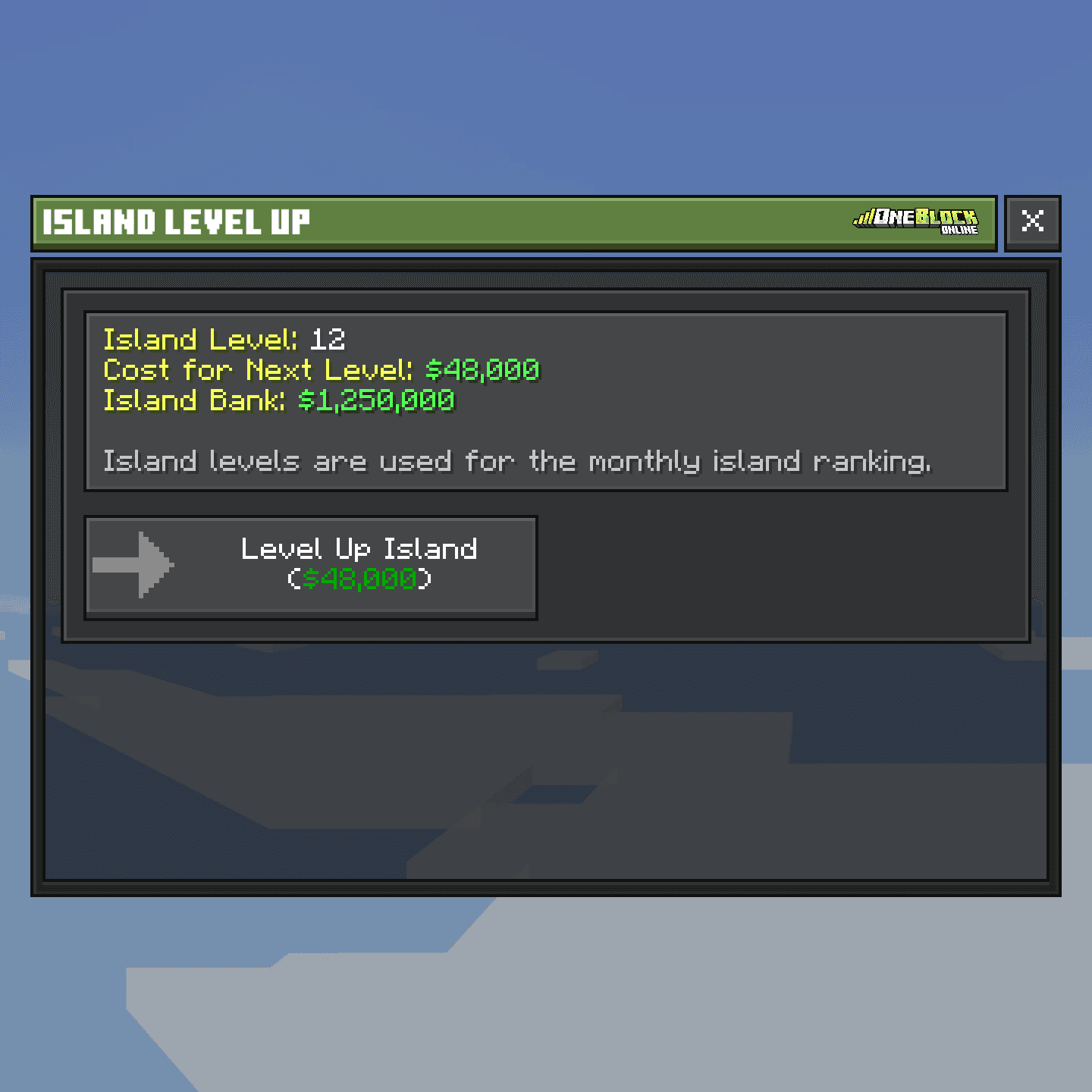
Your island level shows how strong your island is. You buy levels with bank money. Each level costs more than the last. Top islands are shown on the Leaderboards.
Open the Server Menu, tap Island Level, then tap Level Up Island. Type /is top to see the top 10 islands.
Buy an upgrade
- 1
Open the Server Menu
Tap the Server Menu item in your last hotbar slot, or type
/menu. It opens on the Island tab. - 2
Tap Island Upgrades
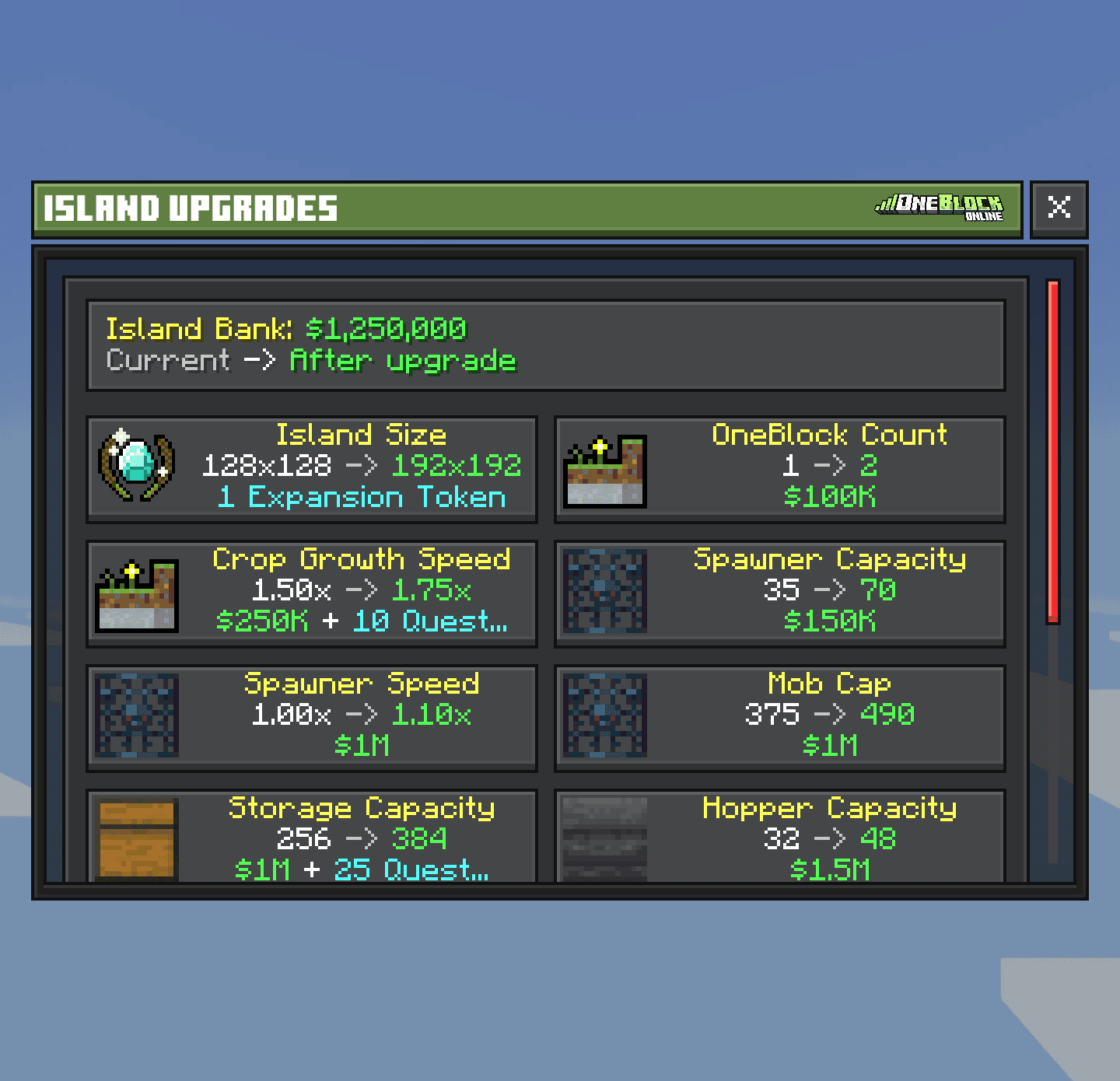
Each row shows what you have now, what you get next and the price. You need to be Co-Leader or Leader.
- 3
Tap a row, then confirm
The upgrade works straight away for the whole island.
| Price part | Who pays |
|---|---|
| Money ($) | The Island Bank |
Orebits  | You. Orebits are the server's premium coins |
| Quest Tokens | The island. You earn them from Island Quests |
Every upgrade
| Upgrade | What it does | Start | Max |
|---|---|---|---|
| OneBlock Count | Gives you another OneBlock to place | 1 | 4 |
 Crop Growth Speed | Crops grow faster | 1x | 3x |
| Spawner Capacity | More spawners on the island | 10 | 400 |
 Spawner Speed | Spawners make mobs faster | 1x | 1.5x |
 Mob Cap | More mobs alive at once | 300 | 825 |
 Storage Capacity | More chests, barrels and shulker boxes | 64 | 1,024 |
 Hopper Capacity | More hoppers | 16 | 512 |
 Quest upgrades | More and better Island Quests | — | — |
 Lucky Block Chance | Breaking can drop a Lucky Block | 0% | 0.25% |

What to buy first
A second OneBlock ($100,000) doubles how fast you get blocks. The first steps of Crop Growth Speed are cheap and help every farm.See every upgrade price
OB = Orebits, QT = Quest Tokens. Each price is for reaching that step.
OneBlock Count
| OneBlocks | Price |
|---|---|
| 2 | $100,000 |
| 3 | $250,000 + 250 OB + 15 QT |
| 4 | $500,000 + 500 OB + 75 QT |
Crop Growth Speed
| Speed | Price |
|---|---|
| 1.25x | $25,000 |
| 1.50x | $75,000 |
| 1.75x | $250,000 + 10 QT |
| 2.00x | $1,000,000 + 25 QT |
| 2.25x | $5,000,000 + 55 QT |
| 2.50x | $25,000,000 + 125 QT |
| 2.75x | $150,000,000 + 305 QT |
| 3.00x | $1,000,000,000 + 790 QT + 1,250 OB |
Spawner Capacity
| Spawners | Price |
|---|---|
| 35 | $50,000 |
| 70 | $150,000 |
| 100 | $500,000 + 20 QT |
| 150 | $2,500,000 + 40 QT |
| 200 | $15,000,000 + 95 QT |
| 300 | $100,000,000 + 250 QT |
| 400 | $750,000,000 + 685 QT + 950 OB |
Spawner Speed
| Speed | Price |
|---|---|
| 1.10x | $1,000,000 |
| 1.20x | $4,000,000 + 50 QT |
| 1.35x | $25,000,000 + 125 QT |
| 1.50x | $200,000,000 + 355 QT + 2,500 OB |
Mob Cap
| Mobs | Price |
|---|---|
| 375 | $150,000 |
| 490 | $1,000,000 |
| 640 | $10,000,000 + 80 QT |
| 825 | $150,000,000 + 305 QT + 200 OB |
Storage Capacity
| Containers | Price |
|---|---|
| 128 | $50,000 |
| 256 | $200,000 |
| 384 | $1,000,000 + 25 QT |
| 512 | $7,500,000 + 70 QT |
| 1,024 | $75,000,000 + 215 QT + 750 OB |
Hopper Capacity
| Hoppers | Price |
|---|---|
| 32 | $500,000 |
| 48 | $1,500,000 |
| 64 | $5,000,000 + 55 QT |
| 128 | $25,000,000 + 125 QT |
| 256 | $150,000,000 + 305 QT |
| 512 | $1,000,000,000 + 790 QT + 1,250 OB |
Quest and Lucky Block upgrades
| Upgrade | Step | Price |
|---|---|---|
| Daily Quest Slots | +1 / +2 / +3 | $200M + 100 OB / $500M + 250 OB / $1B + 500 OB |
| Weekly Quest Slots | +1 / +2 | $250M + 250 OB / $1B + 500 OB |
| Quest Specializations | +1 / +2 / +3 | $25M + 25 QT / $75M + 75 QT + 100 OB / $200M + 150 QT + 250 OB |
| Double Quest Rewards | 4% / 8% / 12% | 100 OB / 250 OB / 500 OB |
| Lucky Block Chance | 0.05% to 0.25% | $25M + 25 QT, up to $250M + 250 QT |
Make your island bigger
Every island starts at 64x64 blocks. Each bigger size costs one Island Expansion Token. Buy tokens by typing /store and opening the Islands tab (1,690  each). Then buy the size in Island Upgrades.
| Tokens used | Island size |
|---|---|
| 0 | 64x64 |
| 1 | 128x128 |
| 2 | 192x192 |
| 3 | 256x256 |
| … | +64 each time |
| 7 | 512x512 (biggest) |
Island Limits
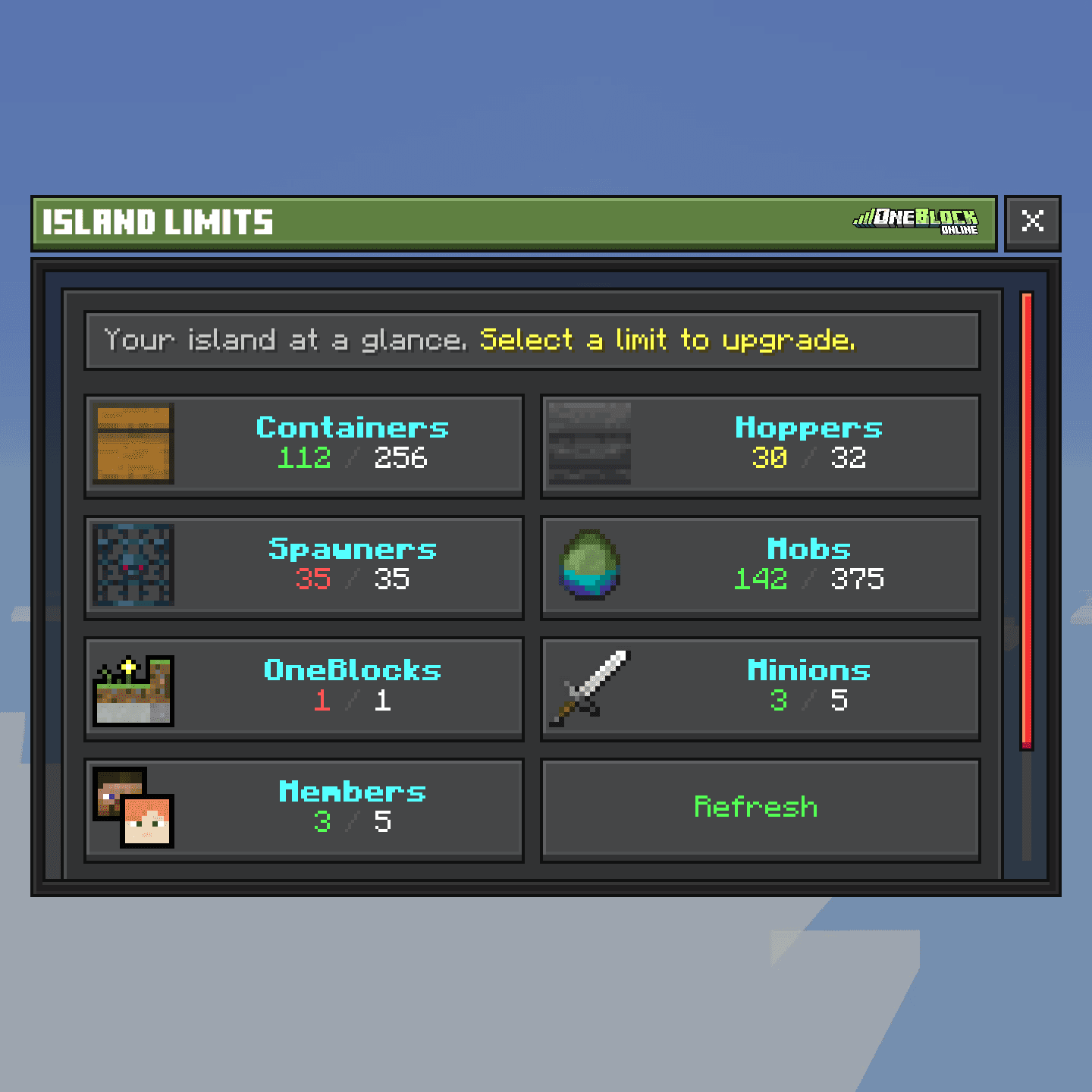
Island Limits shows how much of each thing you have and the most you can have. Open the Server Menu and tap Island Limits, or type /is limits. Green is fine, yellow is almost full, red is full. Tap a row to buy the upgrade for it.
| Limit | Start | Max | How to raise it |
|---|---|---|---|
| Containers | 64 | 1,024 | Storage Capacity |
| Hoppers | 16 | 512 | Hopper Capacity |
| Spawners | 10 | 400 | Spawner Capacity |
| Mobs | 300 | 825 | Mob Cap |
 Minions | 5 | 5 | Can't be raised |
 Members | 5 | No limit | /store, Islands tab |
When there are too many mobs, the island removes some. Named, tamed and leashed mobs are never removed.
No chests on donkeys, mules or llamas
Animals wearing a chest are removed from islands, with the items inside. Keep your things in normal chests.See other fixed limits
| Thing | Most per island |
|---|---|
 Armor stands | 96 |
 Paintings | 96 |
 Minecarts | 48 |
 Boats and rafts | 48 |
 Special blocks (texts, teleporters, parkour and more) | 30 |
The island edge
The edge of your island is a see-through wall. You can't walk or build past it. If you fall off, you go back to the island spawn. You can make the wall fainter in Settings.
The wall at the island edge
Zrzut ekranu wkrótce