





Tools & Special Blocks
Builder wands, trench tools, harvester hoes, and fun blocks like teleporters and parkour.
Special tools help you build and mine much faster. Special blocks make your island fun to visit: teleporters, parkour, spleef and floating text. Most tools come from Bundles.
Builder Wands
A builder wand places lots of blocks at once. It uses the blocks in the hotbar slot right after the wand. For example: wand in slot 3, stone in slot 4.
| Builder Wand | Basic Builder Wand | |
|---|---|---|
| Shapes | Box, Hollow Box, Sphere | Straight line |
| Size | Up to 1,024 blocks | 1 to 8 blocks |
| Where to get it | Orebits store (1,000 uses for 1,000  ), Builder Kit, Treasure Pond | Luxury and Eternal Bundles, Treasure Pond |
To open the Orebits store, type /store orebits and go to the Misc tab. Orebits are the server's premium coins.
Use the Builder Wand
- 1
Pick a shape
Hit to switch between Box, Hollow Box and Sphere.
- 2
Start
Use on a block. An outline appears.
- 3
Change the size
Walk forward, back or sideways, or jump. Sneak to move it.
- 4
Build
Use again. Green means OK, red means something is in the way.

Wskazówka
The Builder Wand uses one use per build, big or small. A 1,000-block box costs the same as one block, so build big.The Basic Builder Wand builds a line of 5. Aim at a block side and Use. Type /basicbuilderwand, then Hit to change the length from 1 to 8.
A Builder Wand Hollow Box outline
Zrzut ekranu wkrótce
Trench tools
A trench tool breaks a flat 3x3 square around the block you mine. Each block it breaks uses 1 use, so a full square uses 9.

| Tool | Breaks | Uses | Where to get it |
|---|---|---|---|
| Trench Pickaxe | Stone, ores and hard blocks | 100 | Daily Bundle |
 Trench Axe | Logs and wood | 100 | Daily Bundle |
 Phoenix Trench Pickaxe | Stone, ores and hard blocks | Never runs out | Phoenix Bundle |
 Phoenix Trench Axe | Logs and wood | Never runs out | Phoenix Bundle |
You can add enchants to trench tools. See Custom Enchants.
Harvester Hoes
Break one fully grown crop and every grown crop of the same kind around it is harvested and planted again, for just 1 use.

| Hoe | Area | Uses | Where to get it |
|---|---|---|---|
 Luxury Harvester Hoe | 3x3 | 2,500 | Luxury Bundle |
| Eternal Harvester Hoe | 5x5 | 5,000 | Eternal Bundle |
Sell Mode: sneak and use the hoe to turn it on. Your harvest is sold right away and the money goes to you.
An Eternal Harvester Hoe clearing a 5x5 wheat field
Zrzut ekranu wkrótce
Special blocks
Special blocks make your island fun for visitors. Buy them in the Orebits store: type /store orebits and go to the Misc tab.
| Block | What it does | Price | Per island |
|---|---|---|---|
 Placeable Text | Floating text with up to 3 lines | 200 | 20 |
 Teleporter Kit | Two pads. Step on one to go to the other | 300 | 5 pairs |
 Parkour Plate Kit | A Start and Finish pad with a timer and top times | 200 | 5 |
 Spleef Arena Kit | A floor game: break the floor under others. Last one standing wins | 250 | 1 |
 Giveaway Chest | Fill it with prizes. Visitors enter to win (Events & Giveaways) | 200 | 1 |
- Teleporters and parkour: place the kit once for the first pad, then use the same kit again for the second.
- Spleef: place Corner A and Corner B at the same height. Tap a corner to join. You need at least 2 players to start.
- Text: place it, then tap it to change the words and size.
A parkour Start pad with its top times
Zrzut ekranu wkrótce
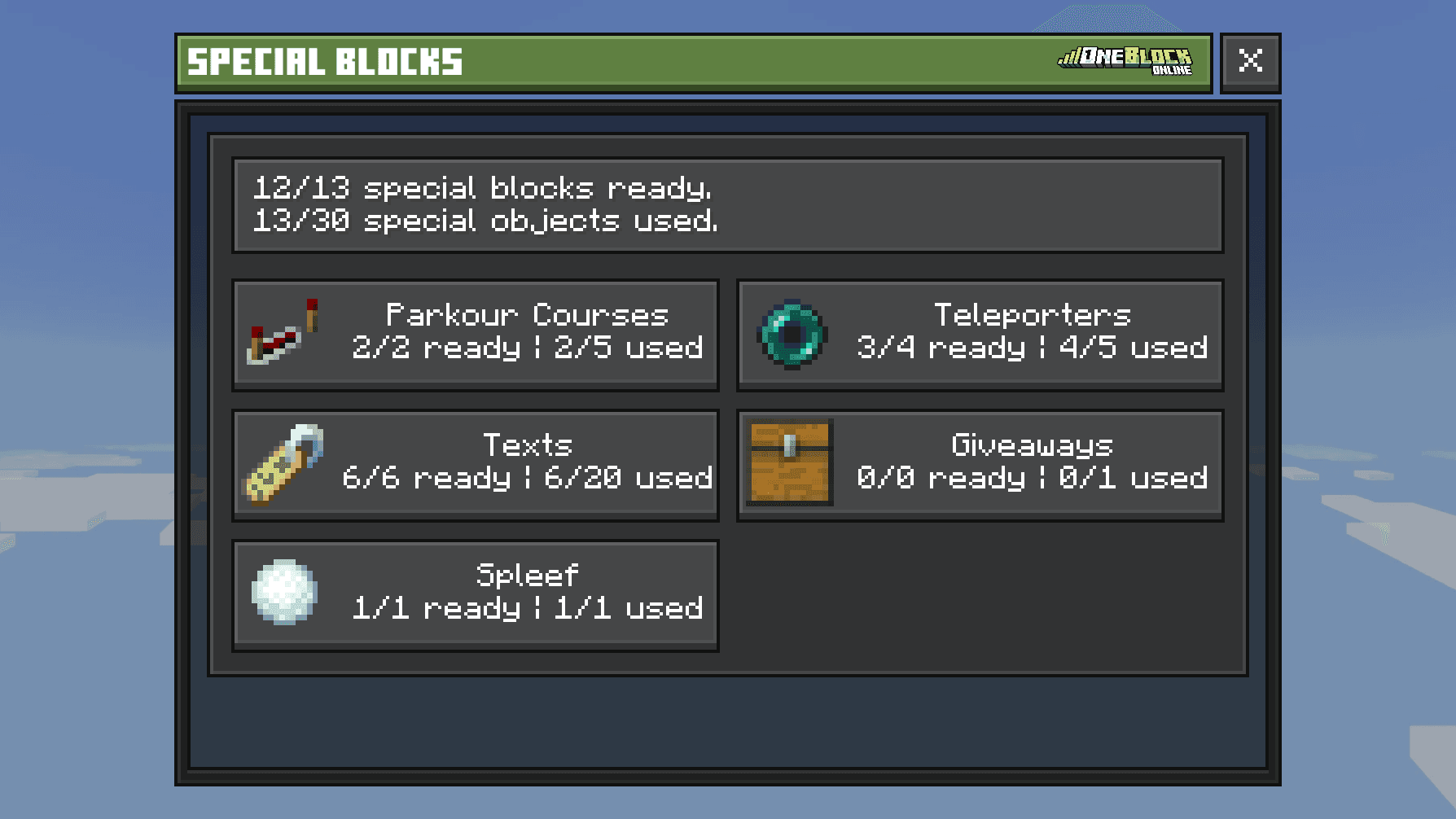
Change or remove special blocks
- 1
Open the Server Menu
Tap the Server Menu item in your last hotbar slot, or type
/menu. It opens on the Island tab. - 2
Tap Island Settings, then Special Blocks
You need to be Co-Leader or Leader.
- 3
Pick a kind
Parkour Courses, Teleporters, Texts, Giveaways or Spleef. Then pick one to rename it, change who can use it, or delete it. Deleting gives the item back.
Trench tools and mining enchants never break chests, machines or special blocks by accident. You can still break them by hand.